
A customer in Basra taps your Instagram ad, waits for your landing page to open on mobile data, sees a blank white screen, and goes back to scrolling. You paid for that click, and you will never know why it did not turn into an enquiry, because slow website speed left no trace in your reports. Poor website speed rarely shows up as a clear error message. It shows up as lower conversions, higher ad costs, and weaker search visibility, quietly, every day.
This guide explains website speed for Iraqi business websites in practical terms. It covers what Google’s Core Web Vitals measure, how to test your site the way Iraqi visitors actually experience it, the most common reasons local websites are slow, and the fixes that usually make the biggest difference, from hosting and images to scripts and Arabic fonts. It is written for website owners who want to understand the problem and for developers who need a prioritized checklist.
Why Website Speed Matters for Iraqi Businesses?
Website speed affects three things that matter to any business: whether visitors stay, whether they convert, and how search engines evaluate your pages.
Most Visitors Arrive on Mobile
Iraq is a mobile-first market. DataReportal’s Digital 2026 report for Iraq puts median mobile download speed at around 56 Mbps, but a median hides a wide range: speeds vary by city, network, time of day, and building. Our Iraq digital statistics hub collects these figures with sources. A site that feels fast on office Wi-Fi in Baghdad can feel slow on a phone in a crowded market, so website speed has to be judged on mobile first.
Slow Pages Waste Ad Spend
When you pay for traffic from Google, Meta, TikTok, or Snapchat, every visitor who leaves before the page loads is money spent for nothing. Improving website speed on landing pages is often one of the cheapest ways to get more enquiries from the same ad budget. Our guide to landing page design covers the other half of that equation.
Speed Is One Part of Search Performance
Google uses page experience signals, including Core Web Vitals, as part of how it evaluates pages. Relevance and content quality still matter more, so a fast page with weak content will not rank on speed alone. But when competing pages are similar, poor website speed and a frustrating mobile experience can hold you back, and slow sites are also harder for search engines to crawl efficiently.
Core Web Vitals Explained
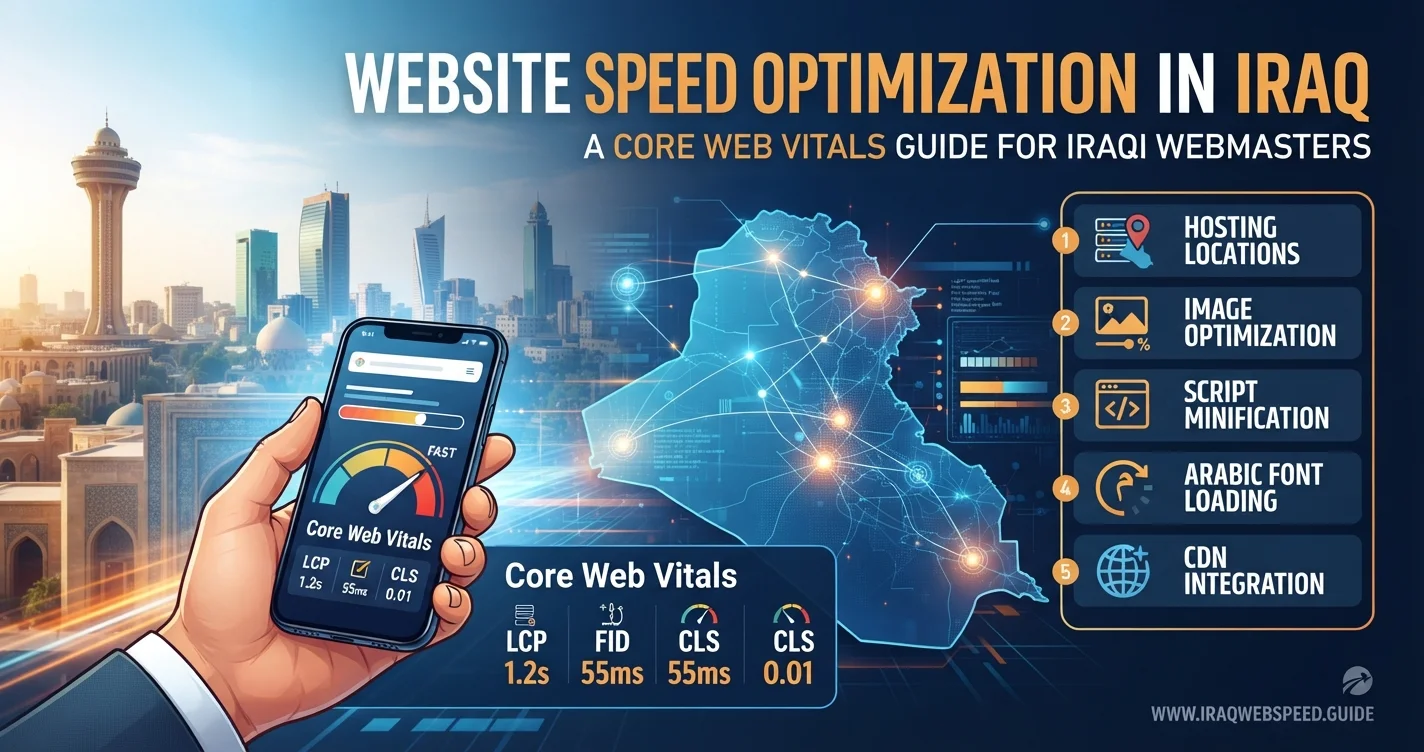
Core Web Vitals are three metrics Google uses to measure real-world user experience. Understanding them turns vague website speed complaints into specific problems you can fix.
The Three Metrics
| Metric | What it measures | Good | Poor |
|---|---|---|---|
| Largest Contentful Paint (LCP) | How quickly the main content appears | 2.5 seconds or less | Over 4 seconds |
| Interaction to Next Paint (INP) | How quickly the page responds to taps and clicks | 200 ms or less | Over 500 ms |
| Cumulative Layout Shift (CLS) | How much the layout jumps while loading | 0.1 or less | Over 0.25 |
Values between “good” and “poor” are rated “needs improvement.” INP replaced the older First Input Delay metric in March 2024, so older guides that mention FID are out of date.
How Google Scores Them?
Google assesses each metric at the 75th percentile of real Chrome visits over the previous 28 days, with mobile and desktop rated separately. In plain terms, your page passes only if at least three out of four real visits have a good experience. A fast result on your own phone does not guarantee a pass.
Field Data vs Lab Data
Field data comes from real visitors and is what Google uses for Core Web Vitals. Lab data comes from a simulated test and is useful for diagnosing problems. Smaller Iraqi websites may not have enough traffic to produce field data, in which case lab tests and real-device testing are your main guide to website speed.
How to Measure Website Speed Properly?
Testing website speed the right way saves you from fixing the wrong things.
Use PageSpeed Insights and Search Console
Google’s PageSpeed Insights shows both field data, when available, and a lab test with specific recommendations. Google Search Console’s Core Web Vitals report groups your URLs by status, so you can see whether problems affect one template, such as product pages, or the whole site. Our technical SEO audit checklist explains how this fits into a wider audit.
Test on Real Phones and Local Networks
Open your key pages on an ordinary mid-range Android phone using mobile data, not Wi-Fi, ideally from more than one city and network. Watch how long it takes before you can read the headline, see the main image, and tap the WhatsApp button. This simple test often reveals website speed problems that desktop tools understate.
Test the Pages That Earn Money
Do not only test the homepage. Test your main service pages, landing pages used in ads, category and product pages if you sell online, and your contact page. These are the pages where website speed affects revenue directly.
Why Iraqi Websites Are Often Slow?
Most slow sites share a handful of causes. Identifying yours is the first step in any website speed optimization project.
Hosting That Is Too Cheap or Too Far Away
Low-cost shared hosting can be crowded and underpowered, and servers located far from your visitors add delay to every request. Slow server response time, often measured as Time to First Byte, delays everything else on the page. Our comparison of shared, VPS, and cloud hosting explains which option fits which kind of site.
Oversized Images
Uploading photos straight from a camera or phone, often several megabytes each, is one of the most common causes of poor website speed. A homepage slider with five full-size images can weigh more than many entire websites.
Too Many Plugins and Third-Party Scripts
Every chat widget, tracking pixel, popup tool, social feed, and plugin adds code that the phone must download and run. Sites built on content management systems often accumulate plugins over the years that nobody remembers installing, and each one chips away at website speed.
Heavy Arabic Web Fonts
Arabic fonts usually contain many more characters and shapes than Latin fonts, so the files can be large. Loading several weights of an Arabic font and an English font on every page adds noticeable delay, especially on mobile, and it is a website speed problem unique to Arabic and bilingual sites.
No Caching
Without page caching, the server rebuilds each page for every visitor. Without browser caching, returning visitors download the same files again. Both are easy website speed wins that many sites miss.
Fixes That Make the Biggest Difference
Not every recommendation in a speed report deserves equal attention. These fixes usually improve website speed the most for typical Iraqi business websites.
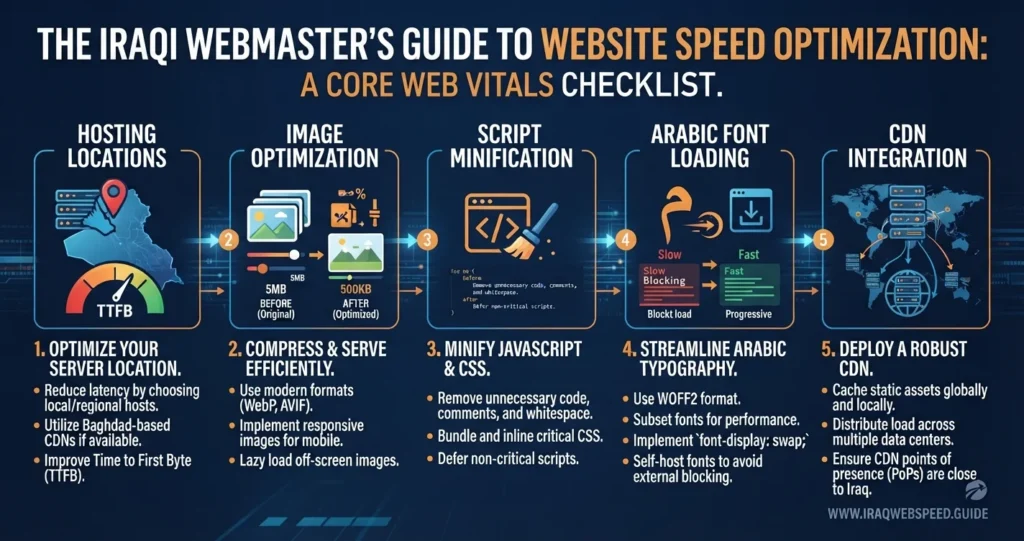
Improve Website Speed Through Hosting and Server Response
Choose hosting with adequate resources for your traffic, a modern server setup, and a location that gives low latency to your visitors. Enable server-side caching, keep your software up to date, and monitor response times. Reliable web hosting in Iraq is the foundation every other website speed fix builds on.
Use a Content Delivery Network
A content delivery network stores copies of your images, scripts, and styles on servers in many locations, so visitors download them from somewhere closer. Check where a provider has locations relevant to Iraq and the wider region before choosing one.
Compress and Resize Images for Website Speed
Resize images to the largest size they will actually be displayed at, convert them to modern formats such as WebP or AVIF, and compress them. Lazy-load images further down the page, but never lazy-load the main image at the top, because that usually delays LCP. This single step often produces the biggest website speed improvement on image-heavy sites.
Remove, Delay, or Defer Scripts
Audit every plugin and third-party script. Remove what you do not use, load non-essential scripts after the main content, and avoid loading chat widgets or heavy trackers until they are needed. Fewer and lighter scripts improve both LCP and INP, and usually lift overall website speed more than any single plugin.
Optimize Arabic and English Fonts
Limit the number of font families and weights, use subsets that contain only the characters you need, set fonts to display fallback text while loading, and preload the one or two font files used above the fold. For bilingual sites, load Arabic fonts on Arabic pages and Latin fonts on English pages rather than both everywhere.
Prevent Layout Shifts
Give images, videos, and embeds fixed dimensions, reserve space for banners and cookie notices, and avoid inserting content above what the visitor is already reading. These steps fix most CLS problems without affecting website speed elsewhere.
Reduce Heavy JavaScript for Better INP
Poor INP usually comes from large amounts of JavaScript running when the visitor taps something, such as menus, filters, or add-to-cart buttons. Breaking up long tasks, removing unnecessary scripts, and simplifying interactive elements improve responsiveness.
Website Speed for Online Stores and Landing Pages
Some page types need extra attention because website speed affects sales directly.
Ecommerce Category and Product Pages
Category pages with many product images and filters are often the slowest on a store. Use properly sized thumbnails, limit the products loaded at once, and make filters lightweight. Our guide to mobile commerce in Iraq covers the wider mobile shopping experience.
Campaign Landing Pages
Landing pages for ads should be lean: one clear message, a compressed hero image, a fast form or WhatsApp button, and only the tracking scripts you actually need. Every extra element should earn its place, because website speed on a paid landing page translates directly into cost per lead.
A Prioritized Website Speed Checklist
If you are starting from a slow site, work in this order:
- Measure key pages on mobile with PageSpeed Insights and a real phone.
- Fix hosting, server response, and caching.
- Resize and compress images, especially above the fold.
- Remove unused plugins and delay non-essential scripts.
- Optimize fonts and fix layout shifts, then test again.
Re-test website speed after each step so you know which changes helped. This keeps website speed work focused on results rather than chasing a perfect score.
Keeping Your Site Fast Over Time
Website speed is not a one-time project. New plugins, larger images, extra tracking scripts, and theme updates gradually slow sites down again.
Set Simple Rules for Content Editors
Give your team clear guidelines for image sizes and formats, and a rule that no new plugin or script is added without checking its effect on website speed.
Monitor Regularly
Check the Core Web Vitals report in Search Console monthly and re-test key pages after any major change. Ongoing website maintenance should include performance checks alongside security and backups.
Build Speed In From the Start
If you are planning a new website, make performance a requirement in the brief, not an afterthought. A site designed with mobile users and website speed in mind from the beginning is far easier to keep fast than one fixed later. Our guide to responsive, mobile-first web design in Iraq explains this approach.
Frequently Asked Questions About Website Speed
Common causes include underpowered or distant hosting, large images, too many plugins and third-party scripts, heavy Arabic fonts, and missing caching. Testing on a real phone with mobile data and running PageSpeed Insights usually reveals which applies to your site.
Aim for LCP of 2.5 seconds or less, INP of 200 milliseconds or less, and CLS of 0.1 or less at the 75th percentile of real visits. Faster hosting, optimized images, fewer scripts, and fixed dimensions for media usually move all three in the right direction.
Core Web Vitals are part of Google’s page experience signals, but relevance and content quality matter more. Speed helps most when competing pages are otherwise similar, and it always affects conversions.
No. The goal is a good experience for real visitors and passing Core Web Vitals, not a score of 100. Focus on the pages that drive enquiries and sales.
Make Every Visit Count
Better website speed means more visitors stay, more of them contact you, and your ad budget works harder. Measure on real mobile connections, fix hosting and images first, cut unnecessary scripts and fonts, and keep monitoring as your site grows.
If you want a clear picture of what is slowing your site down, Creative 4 All can run a technical review and prioritize the fixes that matter most. Explore our SEO services in Iraq, see our web hosting and domain services, or message us on WhatsApp to request an SEO audit.