


Picture two quotations landing in a procurement manager’s inbox in Basra. One comes from sales@yourcompany.iq. The other comes from a free Gmail address with a few numbers at the end. The prices are similar. Which company looks more established? In Iraq, where many deals still depend on trust and reputation, a professional business email address is one of the cheapest credibility signals you can buy. Yet many companies still run their communication through personal accounts, lose messages when staff leave, and wonder why important emails land in spam.
This guide explains how to set up business email on your own domain. You will learn why it matters, the three main ways to get it, how SPF, DKIM, and DMARC protect your deliverability, how to migrate without losing messages, and how to fix the most common problem of all: emails going to spam.
Why Free Email Addresses Cost Iraqi Businesses Trust?
A free personal address is convenient, but compared with business email it sends the wrong message in a business context.
Credibility With Clients and Tender Committees
Clients, partners, and procurement teams notice email addresses. A business email on your own domain shows that the company is real, has invested in its identity, and will still be reachable next year. For contractors, suppliers, and service firms bidding for larger projects, this matters more than many owners realize. A free address can make an otherwise strong proposal look informal.
Control When Staff Change
When employees use personal accounts for company communication, the company does not own those conversations. If someone leaves, client history, attachments, and contacts may leave with them. With business email on your domain, the company controls every account, can reassign mailboxes, and keeps records intact.
Consistency With Your Brand
Your domain appears on your website, business cards, invoices, social profiles, and WhatsApp Business profile. Using the same domain for email ties everything together. Consistent business email also makes phishing harder, because customers learn to expect messages only from your genuine domain.
Three Ways to Get Business Email on Your Domain
Before setting up mailboxes, you need a domain. If you have not registered one yet, our guide to .iq domain registration explains the options. Once you have a domain, there are three common routes.
Email Included With Your Web Hosting
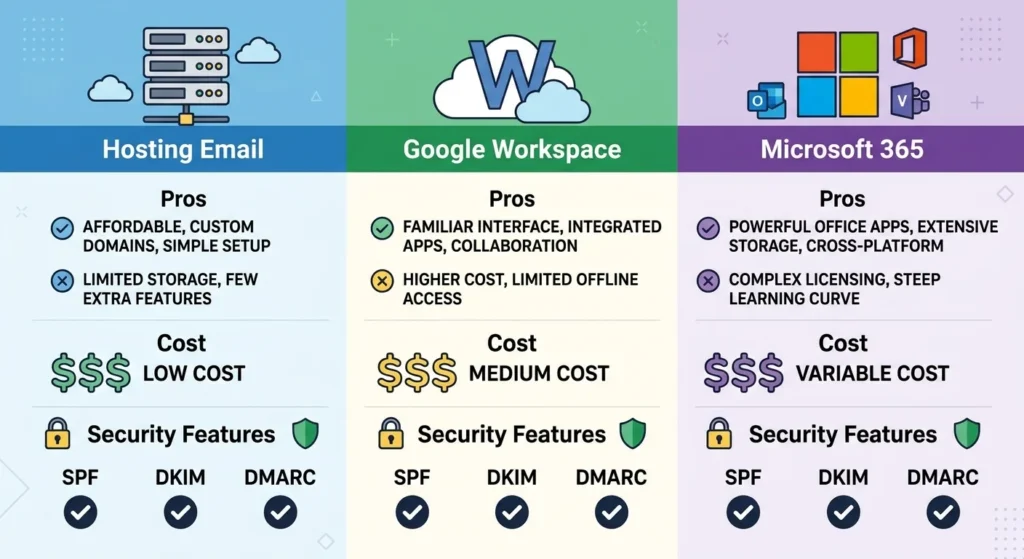
Many hosting plans include email accounts managed through a control panel such as cPanel. This is the simplest and often the cheapest business email option for small teams. The trade-offs are that storage, spam filtering, and reliability depend on your host, and if the hosting server has problems, both your website and your business email can be affected at the same time.
Google Workspace
Google Workspace provides Gmail on your own domain, along with Google Drive, Calendar, Meet, and shared documents. Many teams find it familiar because they already use Gmail personally. Its spam filtering and mobile apps are strong, and it suits companies that collaborate heavily online. It is billed per user, so the cost of this business email option grows with team size.
Microsoft 365
Microsoft 365 provides Outlook-based business email with Word, Excel, Teams, and OneDrive. It is a natural fit for companies that rely on Microsoft Office documents, particularly in engineering, finance, and corporate environments, or that work with international partners using the same tools. Like Google Workspace, it is billed per user.
How to Choose a Business Email Provider
Choose hosting email if you need a few simple mailboxes on a tight budget and your host is reliable. Choose Google Workspace or Microsoft 365 if email is central to your work, you want stronger security and collaboration tools, or you want email independent from your website hosting. Check current pricing directly with the provider, because plans and prices change.
SPF, DKIM, and DMARC Explained in Plain Terms
Setting up mailboxes is only half the job. Without proper authentication records, your business email may be treated as suspicious or rejected entirely.
SPF: Who Is Allowed to Send
SPF is a DNS record listing which servers are allowed to send email for your domain. If you use Google Workspace and also send newsletters through an email marketing platform, both need to be included. A missing or incorrect SPF record is one of the most common reasons legitimate emails fail.
DKIM: Proof the Message Was Not Altered
DKIM adds a digital signature to every email you send. Receiving servers check that signature against a public key published in your DNS. If it matches, they know the message came from your domain and was not changed in transit. Google Workspace, Microsoft 365, and most email platforms provide the DKIM record you need to add.
DMARC: What to Do When Checks Fail
DMARC tells receiving servers what to do with emails that fail SPF or DKIM checks, and can send you reports about who is sending email using your domain. Start with a monitoring policy, review the reports, and tighten the policy once you are confident all legitimate sources are authenticated. Since early 2024, Google and Yahoo have required bulk senders to authenticate their email and publish a DMARC record, so these settings are no longer optional for companies sending at scale.
Why This Matters for Every Company?
Even if you send only a few dozen emails a day, authentication protects your business email reputation and makes it harder for criminals to send fake invoices or phishing messages pretending to be you. Scammers impersonating suppliers is a real risk for any company that handles payments by email.
Setting Up Business Email Step by Step
The exact steps depend on your provider, but the process follows the same pattern.
Plan Your Business Email Addresses
Decide which business email addresses you need before creating them. Personal addresses such as ahmed@yourcompany.iq suit individual staff. Role addresses such as info@, sales@, and support@ work well for shared functions and survive staff changes. Keep naming consistent so customers can guess addresses easily.
Verify the Domain and Create Mailboxes
Your provider will ask you to prove you own the domain, usually by adding a TXT record in DNS. Then create user accounts, set strong passwords, and enable two-step verification for every account. Two-step verification is one of the most effective protections for business email against account takeovers.
Update MX Records and Authentication
MX records tell the internet where to deliver your email. Update them to point to your chosen provider, then add the SPF, DKIM, and DMARC records. Test by sending messages to and from external accounts, and check that replies arrive correctly.
Set Up Devices and Signatures
Install the provider’s apps or configure email on staff phones and computers. Create a consistent email signature with name, role, phone, website, and, where appropriate, a WhatsApp number. Signatures are a small branding detail that makes every business email message look more professional.
Migrating From Old Email Without Losing Messages
Many Iraqi companies already have business email somewhere, whether on old hosting, personal accounts, or a previous provider. Moving needs care.
Inventory Before You Move
List every mailbox, alias, forwarding rule, and shared address currently in use. Note which ones receive important client or supplier emails. Missing one forwarding rule can mean weeks of lost messages before anyone notices.
Copy Old Messages First
Most providers offer migration tools that copy existing emails from the old server using IMAP or a direct import. Run the migration before switching MX records, then run a final sync afterward to catch messages that arrived during the change.
Switch at a Quiet Time
Change MX records during a quiet period, such as a Friday or after working hours, and keep the old mailboxes active for a few days in case some messages are still delivered there while DNS updates spread. Then confirm with staff that everything arrives correctly.
Do Not Break Email When Moving Your Website
A very common problem is moving a website to new hosting and changing DNS without realizing email was hosted on the old server. Before any website migration, check where your business email lives and preserve its DNS records. Regular website maintenance should include documenting these records.
Fixing Business Emails That Go to Spam
If your business email messages keep landing in clients’ spam folders, the cause is usually one of a few fixable issues.
Check Authentication First
Use a free online checker to confirm that your business email domain has SPF, DKIM, and DMARC set up correctly, and that every service sending from your domain is included. Missing DKIM or an SPF record that exceeds its lookup limits are common culprits.
Look at How You Send
Sending large batches of identical emails from a regular business email account, especially with attachments and many links, can trigger spam filters. Use a dedicated email marketing platform for newsletters and campaigns, authenticated on your domain, and keep everyday mailboxes for one-to-one communication. Our guide to email marketing in Iraq explains how to run campaigns without damaging deliverability.
Watch Content and Formatting
Avoid misleading subject lines, excessive capital letters, and messages that are only an image. For Arabic emails, make sure your platform encodes text correctly so messages do not arrive as unreadable characters, which filters and readers both treat with suspicion.
Check Whether Your Domain or Server Is Blacklisted
If you use hosting email on a shared server, another customer’s spam can sometimes affect your reputation. Check blacklist status with an online tool. Persistent problems may be a good reason to move to Google Workspace or Microsoft 365.
Frequently Asked Questions About Business Email
Not as a full business email solution. Google Workspace is the paid way to use Gmail on your own domain. Some workarounds exist, but they lack proper authentication and administration and are not recommended for companies.
It can be, if your host is reliable, spam filtering works well, and your team is small. Companies that depend heavily on email often prefer dedicated providers for reliability and security.
The setup itself can be done in a day, but allow time for DNS changes to spread and for migrating old messages. Planning properly avoids lost emails.
Yes. DMARC helps prevent others from impersonating your domain and improves how receiving servers trust your messages, regardless of volume.
Make Every Email Look and Act Professional
A professional business email setup builds trust, protects company information, and keeps your messages out of spam. Choose the right provider for your team, set up SPF, DKIM, and DMARC correctly, migrate carefully, and keep everyday email separate from bulk campaigns.
If you want help setting up or fixing business email on your domain, Creative 4 All can handle the configuration and migration for you. Explore our web hosting and domain services in Iraq, see our email marketing services, or get a quote today.